

Every Day: Clear the Queue
Most days it's a short check: see what's new, clear it, move on.
1. Start at the Global Dashboard
Open Dashboard first, not a specific role. The New / Maybe / Hire / Pass cards show your whole pipeline at a glance across every active role, and Recent Activity tells you what happened since you last logged in. If you see "You're all caught up," there's nothing urgent this morning.
2. Clear New Candidates first
New, undecided candidates are your highest-priority queue: they're the ones nobody has looked at yet. Click Triage New Candidates to enter Flow Mode, a distraction-free, one-candidate-at-a-time review with keyboard shortcuts (Pass / Maybe / Hire) so you can move through a stack quickly without breaking focus.
3. Sweep the Maybe bucket
Maybe candidates are your "flagged for a second look" pile — they shouldn't sit indefinitely. A few times a week, filter to Maybe on a role's Candidate Pipeline strip and make a final call on each one so your pipeline doesn't quietly accumulate undecided candidates.
4. Send rejection emails from the pipeline board
Flow Mode's keyboard-shortcut Pass moves a candidate to To Clean Up but does not send an email. When you're ready to actually notify passed candidates, go to the role's pipeline board and use the bulk Send Rejection Emails action on the To Clean Up stage — that's the one place this actually sends mail.
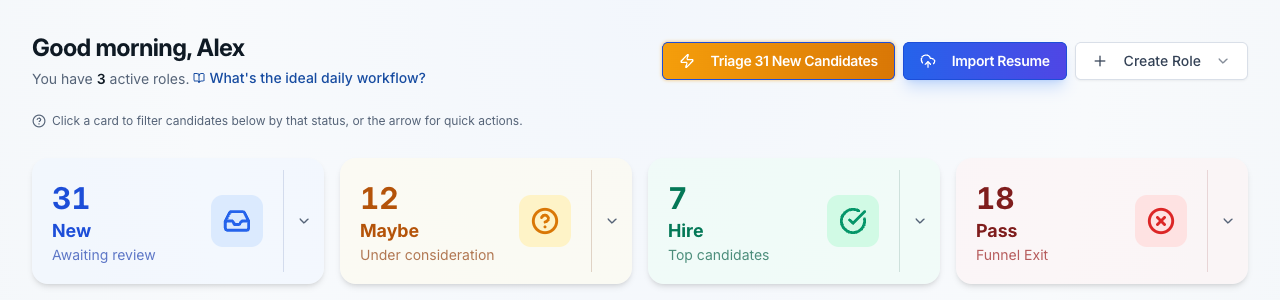
Your morning starting point: everything awaiting review, across every role, in one place.
Every Week: Keep the System Tuned
A few things are worth a slower look on a weekly cadence rather than a daily one.
Revisit your pipeline stages
You get exactly 4 stages — one each for New, Maybe, Qualified and To Clean Up — and that's fixed by design. What you can change any time from a role's Candidate Pipeline strip (via Customize Stages) or Settings → Pipeline is each stage's name, color, and order, so "Qualified" can become "Interviewing" or whatever fits your process. Changes apply to every role at once.
Check Resolve Duplicates
If you're forwarding resumes into a magic email address or accepting multiple submissions per role, duplicate candidates can slip in. A quick weekly pass through Resolve Duplicates keeps your candidate counts and pipeline honest.
Glance at the ROI Dashboard
Not a daily check, but worth a weekly look: the ROI Dashboard estimates the time and cost you're saving, from your own numbers. Useful for justifying the tool to a manager, or just seeing the impact add up.

Customize Stages (top-right) opens Settings → Pipeline directly from any role.
Not sure where to start on a page?
Every major page has its own Page Guide (the lightbulb icon in the header) with page-specific tips and a replayable walkthrough.
The Bottom Line
The habit that matters most: start at the Dashboard, clear New first, then sweep Maybe. Everything else — pipeline stages, ROI tracking, duplicate resolution — is there to support that daily loop, not replace it.
Pair this with how to screen resumes faster for the mechanics of evaluating any single candidate.
Related Reading
Ready to build the habit?
Open your dashboard and see what's waiting for review this morning.