

Triage & Scoring
Decide in one click
Every candidate gets a Hire / Maybe / Pass bar. Click a button or use the arrow keys (← Pass, ↑ Maybe, → Hire). The AI suggests a verdict, but nothing moves until you decide.
At a glance: React and TypeScript in production. Note: Missing enterprise B2B experience.
Decisions You Can Actually Defend
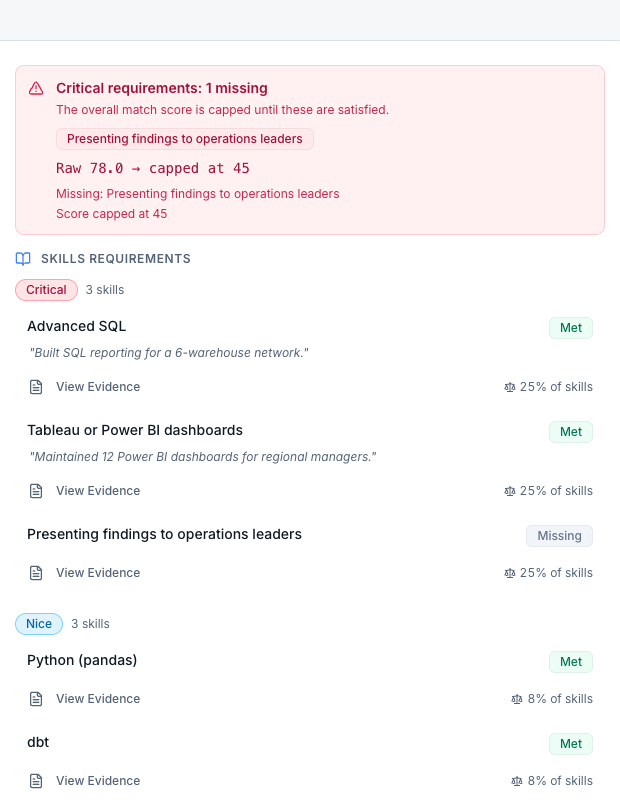
Every score comes with the exact lines from the resume that earned it, highlighted in place. No black box. Toggle between AI-parsed and original resume views, with a fidelity badge verifying extraction accuracy. Rename and recolor your pipeline stages to match how your team actually talks about candidates.
Backed by evidence, or just buzzwords?
Every resume gets a specificity score. Lines with real numbers, results and team sizes count; buzzwords and vague phrases like 'responsible for' don't. Tersen highlights both in the resume and lists every line behind the score with the reason it counted. It also flags skills that are listed but never shown in any job, and bullets copied word for word across applicants. It's a signal for you, never a rejection.
Automation
Magic Email Pipeline
Every role gets a unique email address. Forward a single resume to try it, or set up auto-forwarding in Gmail or Outlook for a fully hands-free pipeline. Resumes are automatically parsed, scored, and added to your queue. Works alongside your existing ATS.
Parsed: resume.pdf
Scored and queued
Parsed: cover_letter.docx
Scored and queued
Parsing: portfolio.pdf
Extracting skills...
Queued: references.pdf
Waiting...
Get the Gist at a Glance
The At a glance panel pulls out the most critical information: years of experience, key skills, and recent roles, into a scannable, concise overview for every applicant.
Coordinate, Don't Just Communicate
Stop juggling tabs. Tersen brings one-click outreach, activity tracking, and human-in-the-loop rejection emails together in one unified workflow. Review and approve every rejection before it sends, maintaining candidate experience without the manual overhead.
Hi {{candidate_name}},
We were impressed by your background and would love to schedule a conversation about the Senior Engineer role at our company...
Today, 10:45 AM
Automated follow-up sent. Logged to timeline.
AI Assistant
Queue completely triaged. 12 candidates moved to shortlist.
Show me the top React devs.
I found 3 strong matches with 90+ scores. Top candidate: Maya Rodriguez (92).
What are their weaknesses?
Limited experience with distributed systems. No mention of CI/CD or DevOps tooling.
Your Context-Aware Assistant
Ask questions about your candidate pool and get AI-powered answers. 'Who are my top 3 React developers?' — evidence-backed results without leaving the candidate view.
ROI & Analytics
Estimate What Screening Costs You
Plug in your own numbers (time per resume, hourly rate, volume) and export the estimate for leadership.
See every score's evidence for yourself
No credit card required. Paste a job description, upload resumes, and decide with the evidence in front of you.