

The Resume Screening Problem
Every open role attracts dozens — sometimes hundreds — of applications. For most recruiters, the process looks the same: open an inbox, skim a resume, make a snap judgment, move on. Repeat until the pile is gone or the day is over.
An initial resume scan is often a quick skim. That's barely enough time to catch a job title and company name, let alone evaluate whether someone actually has the right experience.
The result? Qualified candidates get passed over because they didn't use the right keywords. Unqualified candidates advance because their resume was formatted well. And the recruiter ends up exhausted, with no consistent record of why anyone was accepted or rejected.
Where Manual Screening Breaks Down
Manual resume screening isn't just slow — it's systematically flawed. Here are the most common pitfalls:
Keyword dependency
Most recruiters and ATS systems scan for keywords. Candidates who know this game the system. Candidates who don't get filtered out — regardless of actual qualifications.
Inconsistency across reviewers
Two recruiters reviewing the same resume will often reach different conclusions. Without structured criteria, evaluation is subjective and unrepeatable.
Fatigue-driven errors
Attention drops over a long pile. The resumes near the bottom get a weaker read than the ones at the top.
No audit trail
When a hiring manager asks 'why did you pass on this candidate?' most recruiters can't answer with evidence. The decision was made on a skim and never documented.
A Better Approach: Structured Evaluation
The solution isn't to skim harder. It's to change what screening looks like. Modern AI-powered screening replaces gut-feel decisions with structured, evidence-based evaluation.
The key concept is the Role Card — a structured set of requirements for each role, organized by priority. Instead of a vague job description, you define exactly what matters:
Critical
Must-have qualifications. Missing one caps the score, and you still decide.
Nice-to-have
Bonus qualifications that differentiate equally-matched candidates. Not required.
When evaluation criteria are defined upfront and structured by priority, every resume gets measured against the same standard. No more guessing, no more inconsistency.
How AI Resume Screening Works
AI-powered resume screening takes the structured criteria you've defined and automatically evaluates every resume against them. But unlike simple keyword matching, modern AI understands context.
Evidence extraction
The AI reads each resume and extracts specific evidence — job titles, durations, technologies used, achievements — that maps to your evaluation criteria.
Weighted scoring
Each candidate receives a composite score based on how well their evidence matches your Critical and Nice-to-have requirements.
Sorted triage
Each candidate gets an AI suggestion (Hire, Maybe or Pass) with the evidence behind it, so you know where to look first. You make every decision.
Explainable decisions
Every score comes with evidence. You can see exactly which requirements were matched, which were missed, and what evidence the AI found in the resume.
Step-by-Step: Screening 200 Resumes Against One Role Card
Here's what a modern screening workflow looks like with Tersen:
Build your Role Card
Define your role requirements. Paste your job description and Tersen drafts the requirements; drag them between Critical and Nice-to-have. Use templates for common roles or build from scratch.
Upload resumes
Drag and drop a batch of resumes (PDF, DOCX). Tersen parses each resume, extracts structured data, and begins AI evaluation automatically.
Review AI scores
Every candidate receives a composite score. The AI highlights key evidence for each requirement — what was found, what was missing, and confidence level. Toggle between Parsed and Original views to switch between the AI-structured resume and the raw text, with a fidelity badge confirming extraction accuracy.
One-click triage
Decide in one click with Hire, Maybe, or Pass. Keyboard shortcuts let you work through candidates one at a time.
Export your shortlist
Export your shortlist (CSV or JSON) for the hiring manager, complete with scores, evidence, and your notes. Every decision is documented and defensible.
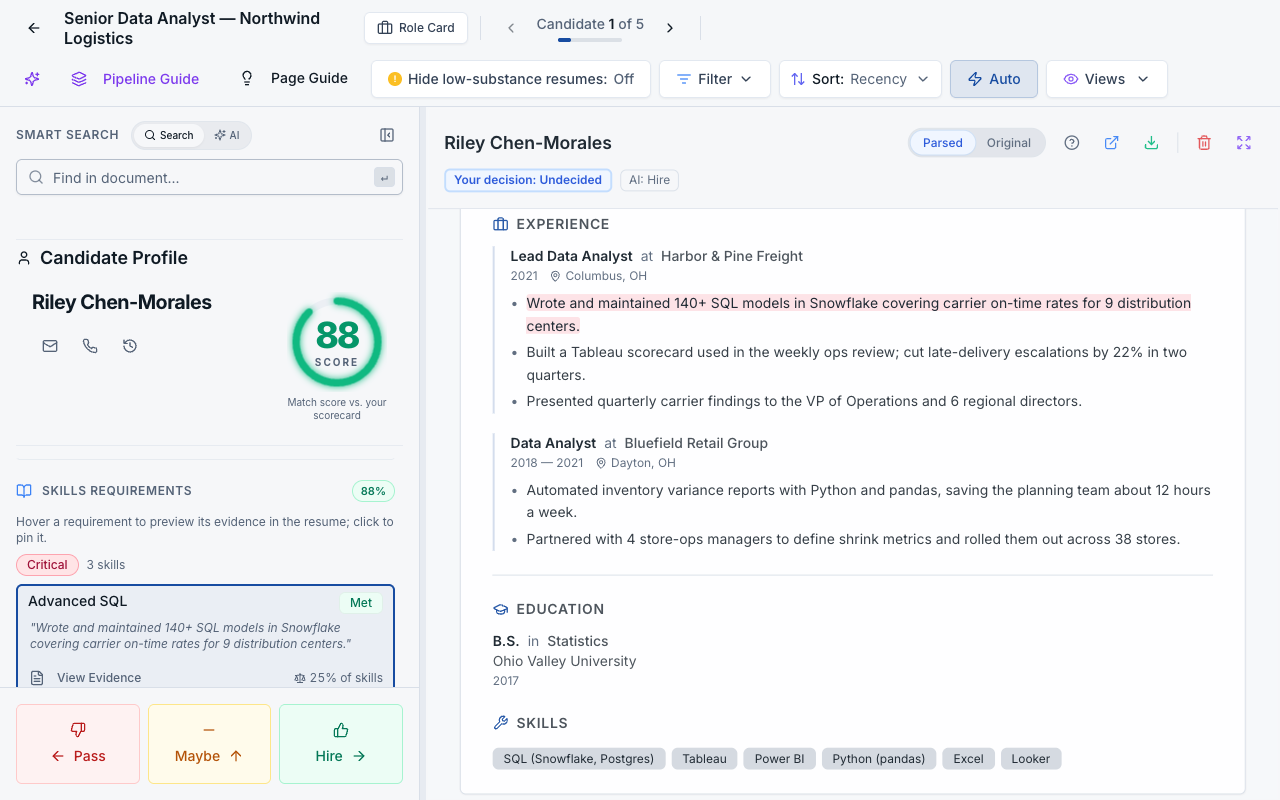
Step 4 in practice: the score, the resume line behind it, and one click to decide.
What You Gain
Related Reading
Ready to Screen Smarter?
Try Tersen free and see how AI-powered screening transforms your hiring workflow. No credit card required.